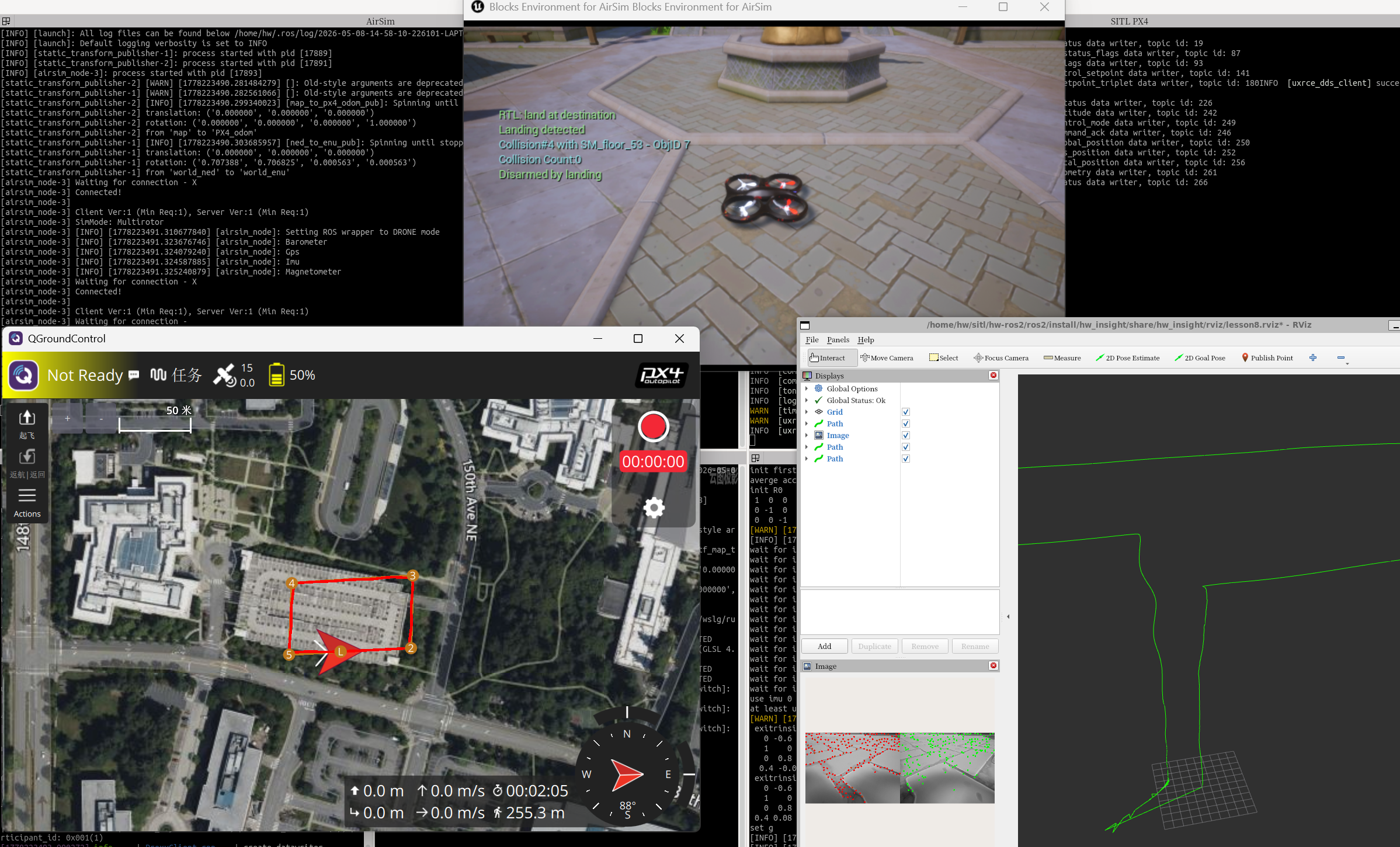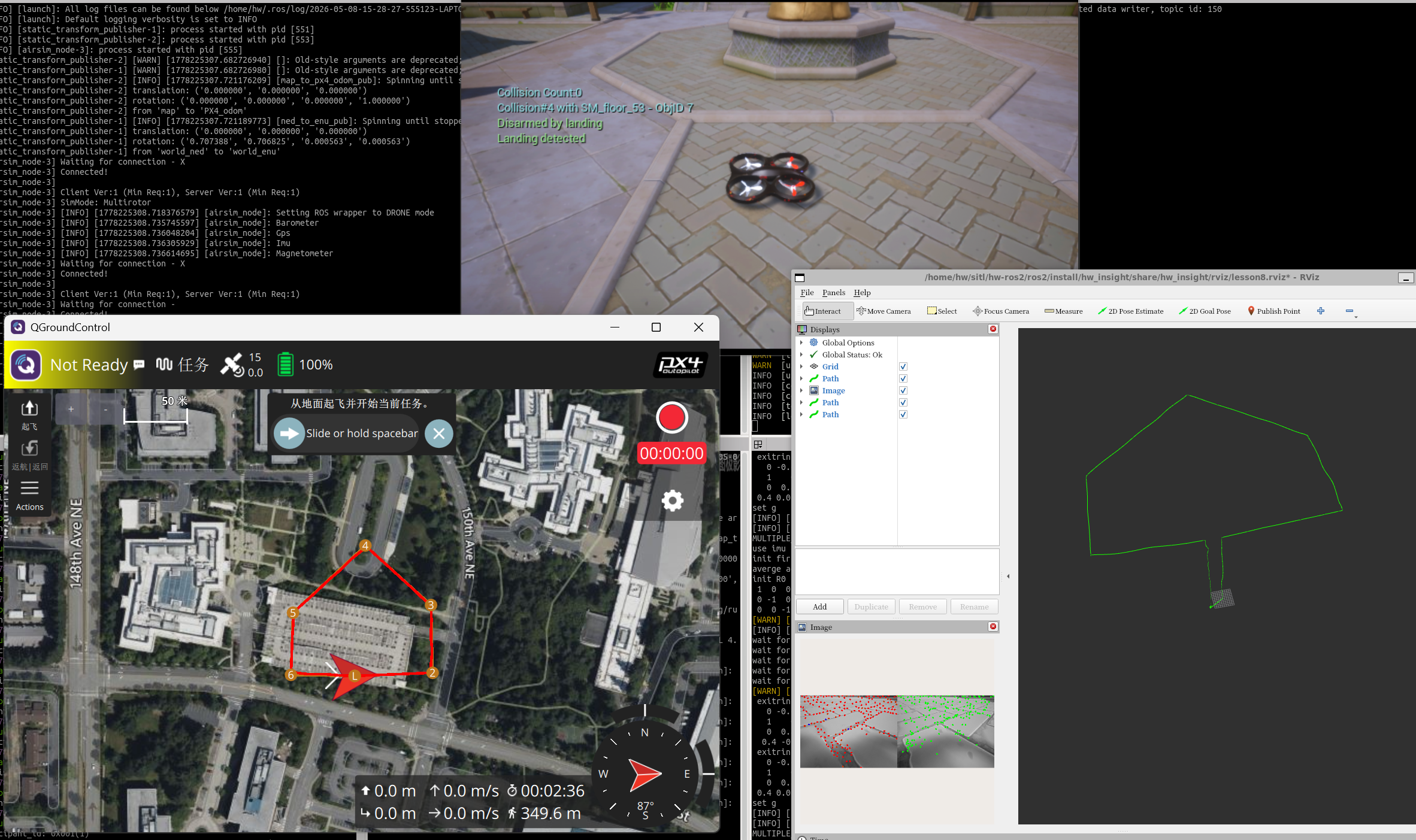
一. 环境搭建
1. 软件安装
VisualStudio(用于编译和运行AirSim环境)
VS安装主要勾选:.NET桌面开发,C++桌面开发,C++游戏开发,C++的Linux开发,以及CMake
虚幻引擎v4.27(AirSIM基于虚幻引擎制作)
AirSIM(开源工程,基于虚幻引擎,实现模拟环境和无人机。settings.json是无人机配置文件,类型,传感器,ip地址等)
WSL-22.04(运行PX4和QGC的ubuntu环境)
PX4-Autopilot(模型飞控的开源软件)
QGroundControl(地面站开源软件)
2. 编译AirSIM
使用Developer PowerShell for VS 2022编译AirSIM
# 先进入AirSIM文件目录
#运行:
build.cmd
编译成功之后会在 /Unreal/Environments/Blocks 目录下生成Block.uproject工程文件
3. 安装PX4
在WSL的Ubuntu22.04环境下执行命令:
sudo apt update
sudo apt install -y pip libpulse-mainloop-glib0 zip
pip config set global.index-url https://mirrors.aliyun.com/pypi/simple/
pip config set global.trusted-host mirrors.aliyun.com
echo 'export PATH=/home/hw/.local/bin:$PATH' >> ~/.bashrc
echo 'export LIBGL_ALWAYS_SOFTWARE=1' >> ~/.bashrc
echo 'export DISPLAY=:0' >> ~/.bashrc
克隆PX4仓库
git clone --recursive https://github.com/PX4/PX4-Autopilot.git
cd PX4-Autopilot
编译启动PX4
cd  px4v1.15.2
make px4_sitl jmavsim            # 轻量级的仿真器
make px4_sitl_default none_iris
4. 安装QGC
# 安装QGC
sudo usermod -a -G dialout $USER
sudo apt-get remove modemmanager -y
sudo apt install gstreamer1.0-plugins-bad gstreamer1.0-libav gstreamer1.0-gl -y
sudo apt install libfuse2 -y
sudo apt install libxcb-xinerama0 libxkbcommon-x11-0 libxcb-cursor-dev -y

# 运行QGC
# 给文件添加可执行权限
chmod +x ./QGroundControl-x86_64.AppImage

# 运行 QGC
./QGroundControl-x86_64.AppImage
5. IP绑定
AirSIM和PX4是通过TCP通讯的,AirSIM运行在Win11上,PX4运行在Ubuntu上,因此需要双方知道对方的IP地址来通信
# 在WSL中输入
hostname -I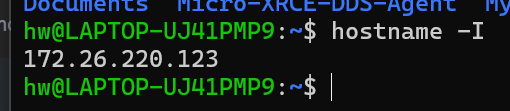
# 在Win11的CMD输入
ipconfig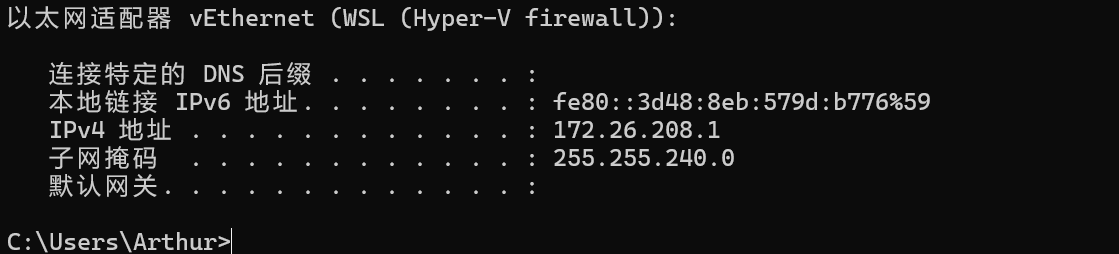
在C:\Users\Arthur\Documents\AirSim目录下的setting.json文件改成Win11的IP地址或者0.0.0.0
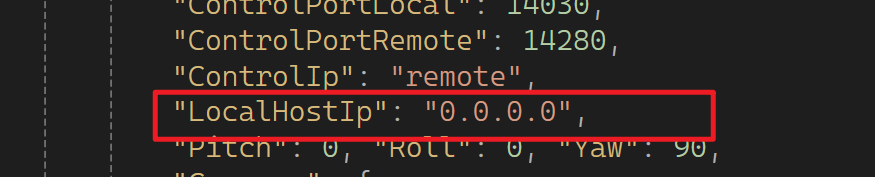
之后在WSL的Ubuntu环境下链接这个IP地址
# 换成自己AirSIM的IP地址(Win11的IP地址)
echo 'export PX4_SIM_HOST_ADDR=172.26.208.1' >> ~/.bashrc
source ~/.bashrc
sudo ufw allow 4560
sudo ufw allow 10049
6.效果验证
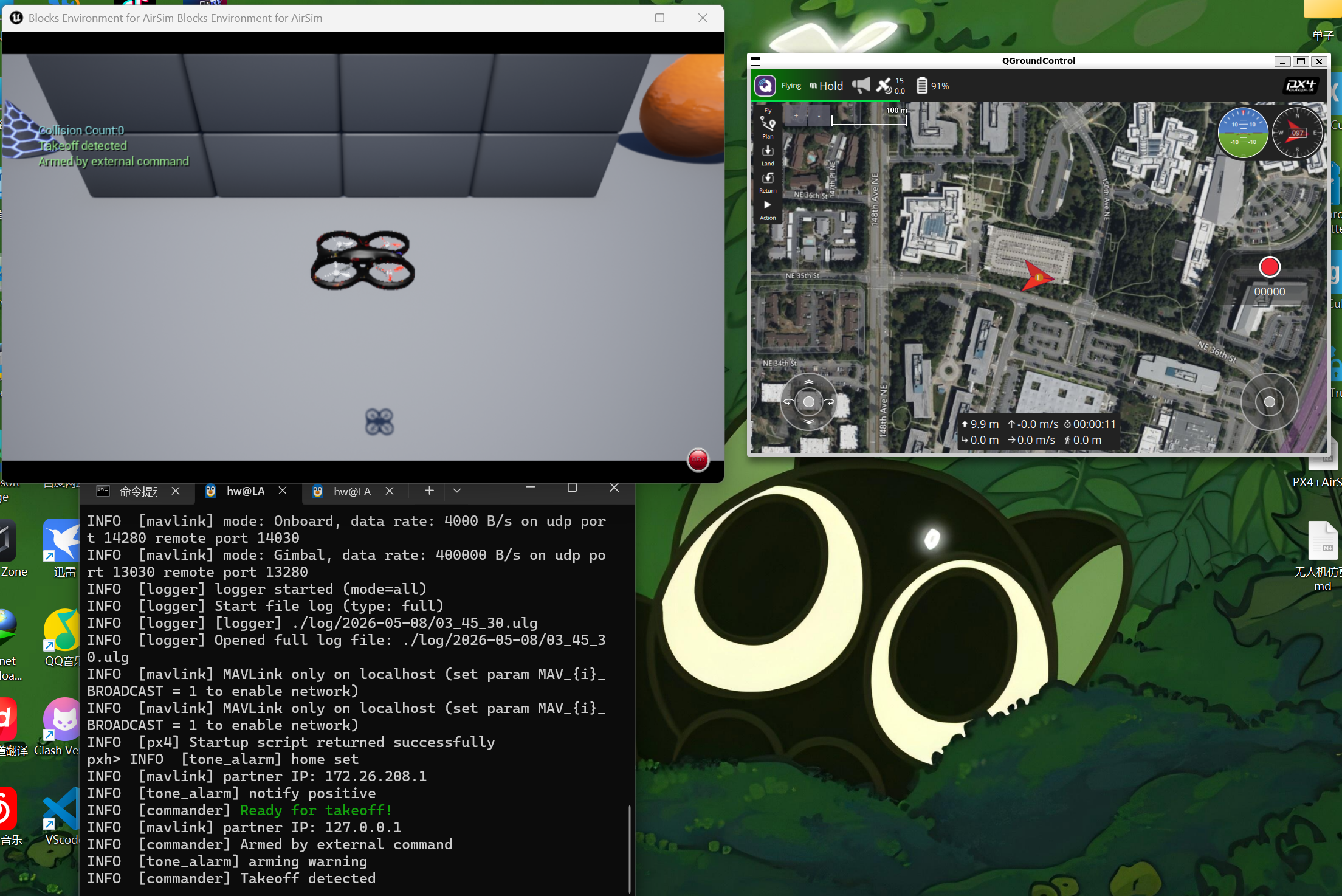
启动AirSIM场景,启动PX4,启动QGC地面站
可以实现这个QGC地面站来控制Setting的无人机,就是成功了
二、自动避障效果
1. json文件添加传感器
               "DistanceFrontMid": {
                   "SensorType": 5,
                   "Enabled" : true,
                   "MinDistance": 0.2,
                   "MaxDistance": 40,
                   "X": 0.2, "Y": 0, "Z": -0.5,
                   "Yaw": 0, "Pitch": 0, "Roll": 0,
                   "DrawDebugPoints": true,
                   "ExternalController": true
               },
               "DistanceFrontLeft": {
                   "SensorType": 5,
                   "Enabled" : true,
                   "MinDistance": 0.2,
                   "MaxDistance": 40,
                   "X": 0.2, "Y": 0, "Z": -0.5,
                   "Yaw": -25, "Pitch": 0, "Roll": 0,
                   "DrawDebugPoints": true,
                   "ExternalController": true
               },
               "DistanceFrontRight": {
                   "SensorType": 5,
                   "Enabled" : true,
                   "MinDistance": 0.2,
                   "MaxDistance": 40,
                   "X": 0.2, "Y": 0, "Z": -0.5,
                   "Yaw": 25, "Pitch": 0, "Roll": 0,
                   "DrawDebugPoints": true,
                   "ExternalController": true
               },
               "DistanceFrontUp": {
                   "SensorType": 5,
                   "Enabled" : true,
                   "MinDistance": 0.2,
                   "MaxDistance": 40,
                   "X": 0.2, "Y": 0, "Z": -0.5,
                   "Yaw": 0, "Pitch": 25, "Roll": 0,
                   "DrawDebugPoints": true,
                   "ExternalController": true
               },
               "DistanceFrontDown": {
                   "SensorType": 5,
                   "Enabled" : true,
                   "MinDistance": 0.2,
                   "MaxDistance": 40,
                   "X": 0.2, "Y": 0, "Z": -0.5,
                   "Yaw": 0, "Pitch": -25, "Roll": 0,
                   "DrawDebugPoints": true,
                   "ExternalController": true
               }
2. 避障脚本文件
import math
import asyncio
from mavsdk import System
from mavsdk import mission_raw
from mavsdk.telemetry import (DistanceSensor, PositionNed)
from mavsdk.offboard import (OffboardError, AccelerationNed, PositionNedYaw, PositionGlobalYaw, VelocityBodyYawspeed)
from mavsdk.mission import (MissionItem, MissionPlan)

glb_leave_home = False  # 全局变量 保存是否离开了home,在home附近是不会触发避障逻辑

glb_mission_current = 0   # 全局变量 保存最新进度
glb_mission_total = 0     # 全局变量 保存任务总数

glb_distance_front = 1000.0  # 全局变量 保存前方距离
glb_distance_left = 1000.0   # 全局变量 保存左前方距离,航向左转45都
glb_distance_right = 1000.0  # 全局变量 保存右前方距离,航向右转45度
glb_distance_up = 1000.0     # 全局变量 保存上前方距离,航向上转45度
glb_distance_down = 1000.0   # 全局变量 保存下前方方距离,航向下转45度
glb_distance_min = 1000.0    # 全局变量 保存所有传感器中的最小距离

# 定期打印所有信息 ################################################################
async def periodically_print():
    while True:
        print(f"\n\nProgress: {glb_mission_current}/{glb_mission_total}")
        print(f"Distances: \n"
              f"Front: {glb_distance_front}m \n"
              f"Back : {glb_distance_back}m \n"
              f"Left : {glb_distance_left}m \n"
              f"Right: {glb_distance_right}m \n"
              f"Up   : {glb_distance_up}m \n"
              f"Down : {glb_distance_down}m \n")
        await asyncio.sleep(1)  # 每秒打印一次


# 监控是否离开了home ##############################################################
async def check_leave_home(drone: System):
    global glb_leave_home
        # 等待获取Home点坐标
    async for home in drone.telemetry.home():
        home_lat = home.latitude_deg
        home_lon = home.longitude_deg
        break
    while True:
        # 获取当前位置坐标
        async for position in drone.telemetry.position():
            current_lat = position.latitude_deg
            current_lon = position.longitude_deg
            break
        #print(f"Home坐标: ({home_lat:.9f}, {home_lon:.9f})")
        #print(f"当前坐标: ({current_lat:.9f}, {current_lon:.9f})\n\n")
        # 判断是否在home附近
        if (abs(current_lat-home_lat) + abs(current_lon-home_lon))  > 0.000015:
            #print("离开home")
            glb_leave_home = True
        else:
            #print("在home附近")
            glb_leave_home = False
        await asyncio.sleep(0.03)


# 监控任务进度 #################################################################
async def monitor_progress(drone: System):
    global glb_mission_current
    global glb_mission_total
    async for mission_progress in drone.mission_raw.mission_progress():
        glb_mission_current = mission_progress.current
        glb_mission_total = mission_progress.total
        print(f"Update Mission progress: "
              f"{glb_mission_current}/"
              f"{glb_mission_total}")


# 监控距离传感器 #############################################################
async def monitor_distance(drone: System):
    global glb_distance_front
    global glb_distance_left
    global glb_distance_right
    global glb_distance_up
    global glb_distance_down
    global glb_distance_min
    # 获取所有距离传感器信息
    async for distance_sensor in drone.telemetry.distance_sensor():
        # 提取传感器姿态角(单位:度)
        roll = distance_sensor.orientation.roll_deg
        pitch = distance_sensor.orientation.pitch_deg
        yaw = distance_sensor.orientation.yaw_deg
        current_distance = distance_sensor.current_distance_m

        # 根据姿态角判断方向,后续优化为初始化时判断一下,判断通过就不再监控
        if math.isclose(yaw, 0.0) and math.isclose(pitch, 0.0) and math.isclose(roll, 0.0):
            # 前
            glb_distance_front = current_distance
        elif math.isclose(yaw, 45.0) and math.isclose(pitch, 0.0) and math.isclose(roll, 0.0):
            # 右
            glb_distance_right = current_distance
        elif math.isclose(yaw, 135.0) and math.isclose(pitch, 0.0) and math.isclose(roll, 0.0):
            # 左
            glb_distance_left = current_distance
        elif math.isclose(yaw, 45.0) and math.isclose(pitch, 0.0) and math.isclose(roll, 90.0):
            # 下
            glb_distance_down = current_distance
        elif math.isclose(yaw, 135.0) and math.isclose(pitch, 0.0) and math.isclose(roll, 90.0):
            # 上
            glb_distance_up = current_distance
        else:
            print("未知距离他传感器方位\n")

        # 获取所有传感器中最小的值
        if glb_distance_front < glb_distance_left:
            tmp_distance_min = glb_distance_front
        else:
            tmp_distance_min = glb_distance_left
        if tmp_distance_min > glb_distance_right:
            tmp_distance_min = glb_distance_right
        if tmp_distance_min > glb_distance_up:
            tmp_distance_min = glb_distance_up
        if tmp_distance_min > glb_distance_down:
            tmp_distance_min = glb_distance_down
        glb_distance_min = tmp_distance_min
        #print(f"最小距离传感器: {glb_distance_min}")


# 简单避障逻辑,遇到障碍上升 #############################################################
AVOIDANCE_TRIGGER_DISTANCE = 7.0   # 避障触发距离阈值
AVOIDANCE_RELEASE_DISTANCE = 15.0  # 避障解除距离阈值

# 方法1:速度避障逻辑,遇到障碍物进行爬升,直到和障碍物的距离大于阈值 ------------------------
async def speed_avoidance(drone: System):
    # 适当后退远离障碍物,避免抵住障碍物导致无法爬升
    print("--加载速度避障逻辑")
    await drone.offboard.set_velocity_body(VelocityBodyYawspeed(0.0, 0.0, 0.0, 0.0))
    await drone.offboard.start()
    print("--适当倒退")
    await drone.offboard.set_velocity_body(
        VelocityBodyYawspeed(
            -0.1,    # X轴速度(前后方向)
            0.0,     # Y轴速度(左右方向)
            0.0,     # Z轴速度(上下方向)
            0.0      # Yaw角速度(机体旋转绕Z轴旋转,0表示保持航向不变)
        )
    )
    #await drone.offboard.set_acceleration_ned(AccelerationNed(0.000000, 0.000000, -1.0))
    await asyncio.sleep(0.5)    # 让无人机后退0.5秒,远离障碍物
    # 设置爬升加速度
    print("--稳定姿态")
    await drone.offboard.set_velocity_body(VelocityBodyYawspeed(0.0, 0.0, 0.0, 0.0))
    await asyncio.sleep(2)
    print("--开始爬升")
    await drone.offboard.set_velocity_body(VelocityBodyYawspeed(0.0, 0.0, -1.7, 0.0))
    while True:
        # 判断前方距离
        if glb_distance_min > AVOIDANCE_RELEASE_DISTANCE :
            break   # 如果前方距离大于阈值,则停止持续爬升逻辑
        await asyncio.sleep(1)
    await asyncio.sleep(1.7)  # 继续爬升1.7秒,留出足够余量
    print("--障碍物已远离,停止爬升!")

    # 停止Offboard模式,继续执行任务
    print("--退出避障逻辑")
    print("恢复执行任务...")
    await drone.offboard.stop()
    await drone.mission.start_mission()

# 避障主循环 ------------------------
async def obstacle_avoidance(drone: System):
    while True:
        #print(f"chcek{glb_distance_front}")
        if glb_leave_home and glb_distance_min < AVOIDANCE_TRIGGER_DISTANCE :
            print(f"近距离发现障碍物{glb_distance_min:.2f},停止前进!")
            await drone.mission.pause_mission()
            #await asyncio.sleep(1)
            await speed_avoidance(drone) # 调用速度避障逻辑
        await asyncio.sleep(0.04)  # 每0.1秒检查一次


# 主函数 ######################################################################
async def run():
    # 连接到飞行器
    drone = System()
    await drone.connect(system_address="udp://:14540")  # 在14540端口上等待PX4的连接
    print("等待连接...")
    async for state in drone.core.connection_state():
        if state.is_connected:
            print("已连接!\n")
            break

    # 启动所有任务
    task_check_leave_home = asyncio.create_task(check_leave_home(drone))
    #task_monitor_progress = asyncio.create_task(monitor_progress(drone))
    task_monitor_distance = asyncio.create_task(monitor_distance(drone))
    task_obstacle_avoidance = asyncio.create_task(obstacle_avoidance(drone))
    #task_periodically_print = asyncio.create_task(periodically_print())
    await asyncio.gather(task_check_leave_home, task_monitor_distance, task_obstacle_avoidance)


# 运行主函数
if __name__ == "__main__":
    asyncio.run(run())
3. 运行效果
# 1.运行虚幻引擎Block场景

# 2.进入WSL的Ubuntu环境的PX4根目录
cd  px4v1.15.2
make px4_sitl_default none_iris

# 3.进入脚本文件存放目录并运行脚本文件
chmod +x avoidance-simple.py
./avoidance-simple.py

# 4.启动QGC地面站
./QGroundControlV4.4.4.AppImage
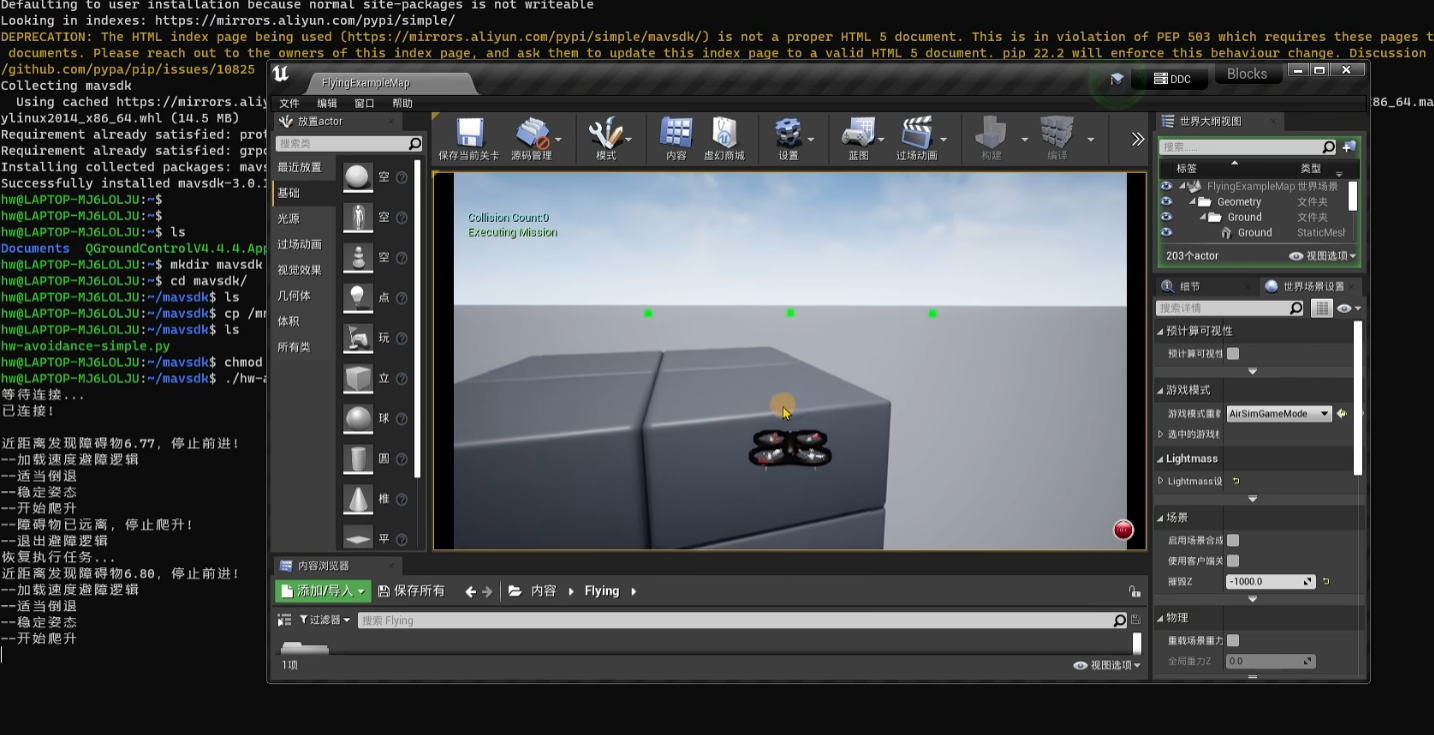
在QGC地面站设定路径之后,遇到障碍物会简单的往上避障
三、ROS2三维建图
1. 安装ROS2
# 更新软件源并安装必要工具
sudo apt update
sudo apt install -y locales software-properties-common curl
sudo locale-gen en_US en_US.UTF-8
sudo update-locale LC_ALL=en_US.UTF-8 LANG=en_US.UTF-8
export LANG=en_US.UTF-8

# 添加 ROS2 官方软件源
sudo curl -sSL https://raw.githubusercontent.com/ros/rosdistro/master/ros.key -o /usr/share/keyrings/ros-archive-keyring.gpg
echo "deb [arch=$(dpkg --print-architecture) signed-by=/usr/share/keyrings/ros-archive-keyring.gpg] http://packages.ros.org/ros2/ubuntu $(lsb_release -cs) main" | sudo tee /etc/apt/sources.list.d/ros2.list > /dev/null

# 更新软件源列表
sudo apt update


# 将 ROS2 环境自动添加到终端启动配置中
echo "source /opt/ros/humble/setup.bash" >> ~/.bashrc
source ~/.bashrc

# 安装依赖管理工具和编译工具
sudo apt install -y python3-rosdep python3-colcon-common-extensions

# 初始化 rosdep
sudo rosdep init
rosdep update
2. json文件
 // 设置无人机摄像头拍摄角度
 "Gimbal":
    {
       "Stabilization": 0,
       "Pitch": 0, "Roll": 0, "Yaw": 0
   },
   "X": 0, "Y": 0, "Z": -1,
   "Pitch": 0, "Roll": 0, "Yaw": 0,
3. 脚本文件
    # RVIZ2显示配置
    lesson4_rviz_path = os.path.join(pkg_share, 'rviz/lesson4.rviz')
    lensson4_rviz_node = launch_ros.actions.Node(
            package='rviz2',
            executable='rviz2',
            name='depth_rviz2',
            arguments=['-d', lesson4_rviz_path]
    )

    # 将深度摄像头的信息转换为点云信息,再将点云信息发送给octomap_server
    lensson4_depth_image_proc_node = launch_ros.actions.Node(
            package='depth_image_proc',
            executable='point_cloud_xyz_node',
            name='depth_to_cloud',
            remappings=[
                ('image_rect', '/airsim_node/PX4/CameraDepth/DepthPlanar'),
                ('camera_info', '/airsim_node/PX4/CameraDepth/camera_info'),
                ('points', '/depth_camera/pointers')
            ]
    )

    # 用上面depth_image_proc转换出的点云信息生成为地图
    lensson4_octomap_server_node = launch_ros.actions.Node(
            package='octomap_server',          # 包名
            executable='octomap_server_node',  # 可执行文件名
            name='octomap_server',             # 节点名称
            parameters=[
                {'frame_id': 'world_ned'},         # 地图坐标系,以世界地图为坐标
                {'base_frame_id': 'PX4/CameraDepth_optical'},  #无人机参考坐标 # PX4/CameraDepth_optical, PX4/CameraDepth_body, PX4/CameraDepth_body/static
                {'resolution': 0.25},              # 地图分辨率,单位:米,当前0.25米的分辨率
                {'compress_map': False},           # 是否压缩地图,启用后会减少网络数据传输,但会加大CPU计算量。用于分布式协同系统
                {'ground_filter': False},          # 过滤地面相关的配置,使用point_cloud_max_z来代替
                {'ground_filter.distance': 0.05},
                {'ground_filter.plane_distance': 0.06},
                {'sensor_model.max_range': 25.0},  # 传感器最大有效距离,也就是深度摄像头的能力
                {'publish_free_space': False},     # 是否发布空的地点值(无阻挡的空间),避障逻辑会使用
                {'use_height_map': True},          # 地图是否用不同的颜色标记高度
                {'dynamic': False},                # 不启用动态边界扩展。下面的设置就是边界设置,超出边界的数据都会丢弃
                {'point_cloud_max_x': 200.0},
                {'point_cloud_min_x': -200.0},
                {'point_cloud_max_y': 200.0},
                {'point_cloud_min_y': -200.0},
                {'point_cloud_max_z': -0.17},
                {'point_cloud_min_z': -50.0},
                {'occupancy_max_z': -0.17},
                {'occupancy_min_z': -50.0},
                {'min_x_size': 0.0},
                {'min_y_size': 0.0},
                {'latch': False}                  # True for a static map, false if no initial map is given。设置为false能够加快处理速度
            ],
            remappings=[
                ('cloud_in', '/depth_camera/pointers')  # 输入点云话题重映射
            ]
    )
4. 运行效果
# 1.运行场景

# 2.运行ROS2
cd hw-ros2/ros2
source install/local_setup.sh
ros2 launch hw_insight 3dmax.launch.py

# 3.运行PX4
cd  px4v1.15.2
make px4_sitl_default none_iris

#运行QGC
./QGroundControlV4.4.4.AppImage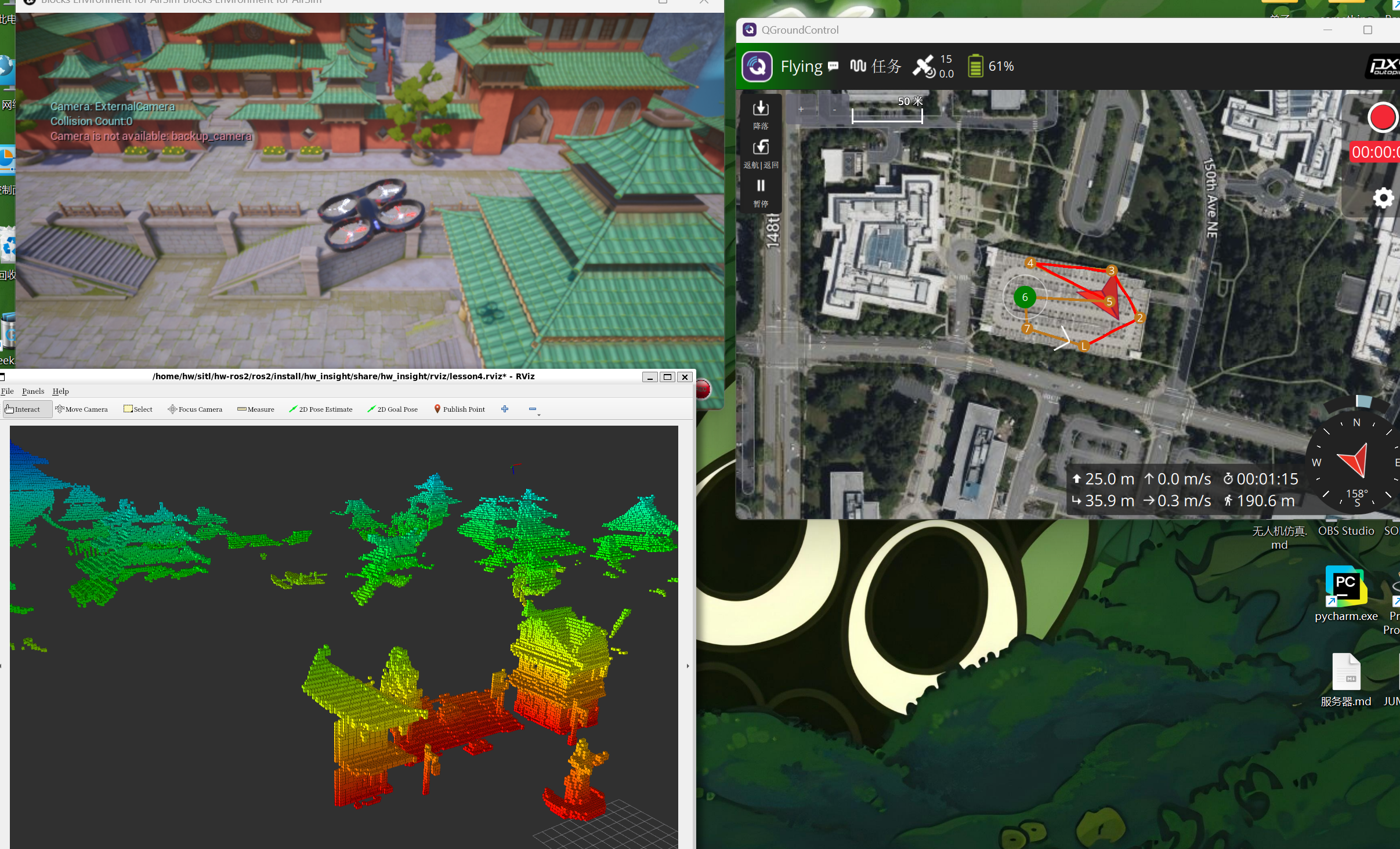
四、YOLO自动识别追踪
1. AirSIM配置文件
// 相机和拍摄角度,一种深度相机,一种RGB相机
"Cameras": {
    "CameraDepth1": {
        "Enabled": true,
        "CaptureSettings": [
            {
            "ImageType": 0,
            "Width": 800,
            "Height": 600,
            "FOV_Degrees": 120
            },
            {
            "ImageType": 1,
            "Width": 800,
            "Height": 600,
            "FOV_Degrees": 120
            }
        ],
        "X": 0, "Y": 0, "Z": 0.7,
        "Pitch": -20, "Roll": 0, "Yaw": 0
    }
},
2. 识别脚本文件
# 订阅相机的RGB图片和深度图片。RGB图片用来给YOLO识别物体,深度图片用来根据YOLO识别的结果计算坐标值
      self.rgb_sub = message_filters.Subscriber(self, Image, f'/airsim_node/PX4/{self.camera_name}/Scene')
        self.depth_sub = message_filters.Subscriber(self, Image, f'/airsim_node/PX4/{self.camera_name}/DepthPlanar')

    # 创建一个近似时间同步器,确保RGB图片和DEPTH图片的同步
    # 参数:订阅者列表,队列大小,时间戳容差(秒)
    self.time_synchronizer = message_filters.ApproximateTimeSynchronizer([self.rgb_sub, self.depth_sub], 2, 0.01)

# 读取YOLO模型,CvBridge用来在RGB和ROS的image格式间进行转换
pkg_share = get_package_share_directory('hw_insight')
yolo_model_path = os.path.join(pkg_share, 'yolo/'+self.yolo_model) # 可换成其他模型
self.model = YOLO(yolo_model_path)
self.bridge = CvBridge()

# 用来发布YOLO识别后,带识别方框的RGB图片
self.yolo_pub = self.create_publisher(Image, '/yolo/output', 1)
# 用来发布识别到的人的位置信息,基于PX4_odom的坐标(转换坐标系)
self.point_pub = self.create_publisher(PointStamped, '/yolo/person_position', 1)

   # 相机内参, 分辨率 800x600,水平视场角 FOV = 120°
    HFOV_deg = 120.0
    HFOV_rad = math.radians(HFOV_deg)
    W = 800.0
    H = 600.0
    # 根据公式 fx = W / (2 * tan(FOV/2)) 计算焦距(像素)
    fx = W / (2 * math.tan(HFOV_rad / 2))
    fy = fx  # AirSim像素是方形的
    cx = W / 2
    cy = H / 2

    # 像素坐标到相机坐标系转换
    x_cam = (u - cx) * depth / fx
    y_cam = (v - cy) * depth / fy
    z_cam = float(depth)
3. 追踪脚本文件
# 追踪逻辑主要数据 =====================================================================
# 经过测试,跟踪的目标人物的速度为6.0米/秒,速度不会变化。以此前提来制定阶梯变速追踪方案
# 从0到15米,每一米的距离给给出对应的速度,因此是15级阶梯
# STEP_DISTANCE 没有实际作用,只是为了让下面的 STEP_SPEED 看起来更方便
# STEP_SCALE 是计算得到的每一米内部的速度变化率
self.STEP_LEVEL = 15
self.STEP_DISTANCE =  [ 0.0,  1.0, 2.0, 3.0, 4.0, 5.0, 6.0, 7.0,  8.0,  9.0, 10.0, 11.0, 12.0, 13.0, 14.0, 15.0]
self.STEP_SPEED =     [-1.0, -0.5, 0.0, 2.0, 5.0, 6.0, 6.0, 6.0,  8.0, 10.0, 12.0, 14.0, 16.0, 18.0, 18.0, 20.0]
self.STEP_SCALE = [0.0] * 16
for i in range(self.STEP_LEVEL):
    self.STEP_SCALE[i] = (self.STEP_SPEED[i+1] - self.STEP_SPEED[i])
self.STEP_SCALE[self.STEP_LEVEL] = 0.0

# 探测逻辑主要数据 =====================================================================
# 当丢失目标超过一段时间后,会触发探测逻辑,无人机会飞到最后一次目标人物的坐标点后,在一定高度进行原地旋转弹出。
# 初始化处于就处于目标丢失状态,无人机会在当前坐标旋转
self.DETECT_YAW_SPEED = 2.0     # 旋转的速度,单位是弧度
self.DETECT_Z_HEIGHT = -5.0     # 旋转的高度,单位米
self.LOST_THRESHOLD = 200       # 丢失目标的时间阈值
self.target_lost_count = self.LOST_THRESHOLD+1  # 丢失目标的计数,初始处于丢失目标状态
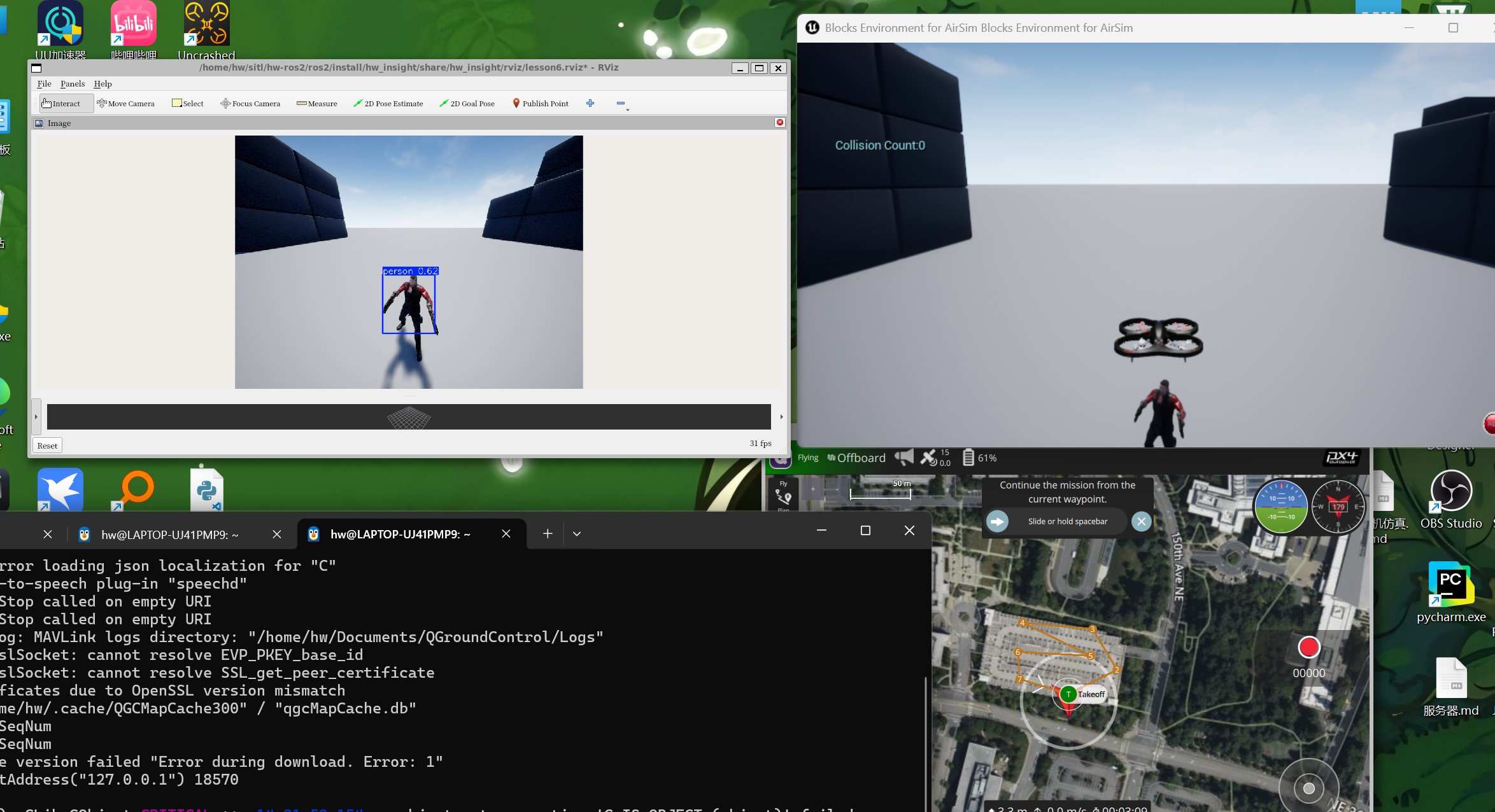
4. 运行效果
五、VINS-Fusion 视觉-惯性导航系统
1. 重点介绍
内参
%YAML:1.0
---
# 定义模型的类型为MEI(Mixed Excitation Model),用于表示相机的投影模型
model_type: PINHOLE
camera_name: camera
image_width: 400
image_height: 300


# 畸变参数,用于校正径向和切向畸变
distortion_parameters:
   k1: 0
   k2: 0
   p1: 0
   p2: 0


# 投影参数,用于将3D点投影到图像平面
projection_parameters:
   fx: 200
   fy: 200
   cx: 200
   cy: 150
外参
%YAML:1.0

# 通用参数
# 支持:1个IMU和1个摄像头;1个IMU和2个摄像头:2个摄像头;
imu: 1         # IMU数量
num_of_cam: 1  # 摄像头数量

imu_topic: "/airsim_node/PX4/imu/Imu"                # IMU数据主题
image0_topic: "/airsim_node/PX4/CameraImage/Scene"   # 第一个摄像头图像数据主题
output_path: "/home/hw/hw-ros2/ros2/src/vins/log/"   # 输出路径


cam0_calib: "cam0_mei.yaml"  # 第一个摄像头的校准文件
image_width: 400  # 图像宽度
image_height: 300  # 图像高度

# IMU和摄像头之间的外参。
estimate_extrinsic: 0   # 0  拥有准确的外参。我们将信任以下imu^R_cam, imu^T_cam,不要改变它。
                        # 1  对外参有初步估计。我们将在您的初步估计周围进行优化。
                        # 2  Don't know anything about extrinsic parameters. You don't need to give R,T. We will try to calibrate it. Do some rotation movement at beginning.


body_T_cam0: !!opencv-matrix  # IMU到摄像头的变换矩阵
   rows: 4
   cols: 4
   dt: d
   data:  [0, 0, 1, 0,
           1, 0, 0, 0,
           0, 1, 0, -1,
           0, 0, 0, 1]


# 多线程支持
multiple_thread: 1

# 特征跟踪参数
max_cnt: 200            # 特征跟踪中最大特征数量
min_dist: 10            # 两个特征之间的最小距离
freq: 10                # 发布跟踪结果的频率(Hz)。至少10Hz才能获得良好的估计。如果设置为0,频率将与原始图像相同
F_threshold: 1.0        # RANSAC阈值(像素)
show_track: 1           # 以主题形式发布跟踪图像
flow_back: 1            # 执行前向和后向光流以提高特征跟踪精度

# 优化参数
max_solver_time: 0.04  # 最大求解迭代时间(ms),以保证实时性
max_num_iterations: 8   # 最大求解迭代次数,以保证实时性
keyframe_parallax: 10.0 # 关键帧选择阈值(像素)

# IMU参数       提供的参数越准确,性能越好
# IMU PARAMETERS
# 根据AirSim settings.json中的IMU配置计算
# AngularRandomWalk = 0.3 => 角速度噪声密度约为 0.3/sqrt(3600) ≈ 0.005
# VelocityRandomWalk = 0.24 => 加速度噪声密度约为 0.24*9.8/1000 ≈ 0.00235
acc_n: 0.1 #0.024          # accelerometer measurement noise standard deviation
gyr_n: 0.1 #0.05           # gyroscope measurement noise standard deviation

# 随机游走参数需要根据其他参数计算
# GyroBiasStability = 4.6 deg/hr = 4.6/3600 deg/s = 0.00128 deg/s
# AccelBiasStability = 36 ug = 36*1e-6*9.8 m/s^2 = 0.000353 m/s^2
acc_w: 0.01 #0.0035         # accelerometer bias random walk noise standard deviation
gyr_w: 0.001 #0.00022        # gyroscope bias random walk noise standard deviation

g_norm: 9.81007     # 重力大小
# acc_n: 6.6848772813371373e-02          # 加速度计测量噪声的标准差,用于模拟加速度计读数的误差,(m/s²)
# gyr_n: 8.7510201471946162e-04        # 陀螺仪测量噪声的标准差,用于模拟陀螺仪读数的误差,(rad/s)
# acc_w: 3.4118090066874175e-03         # 加速度计偏差随机游走噪声的标准差,用于模拟加速度计长期使用的偏差变化,(ug,即微重力加速度,1ug = 1 × 10⁻⁶ g)
# gyr_w: 4.0083425496425443e-05       # 陀螺仪偏差随机游走噪声的标准差,用于模拟陀螺仪长期使用的偏差变化,(deg/h)
# g_norm: 9.81007     # 重力大小


# 非同步参数
estimate_td: 0                      # 在线估计摄像头和IMU之间的时间偏移
td: 0.0                             # 时间偏移的初始值。单位:秒。读取的图像时钟 + td = 实际图像时钟(IMU时钟)

# 回环闭合参数
load_previous_pose_graph: 1       # 加载和重用以前的姿态图;从'pose_graph_save_path'加载
pose_graph_save_path: "/home/hw/hw-ros2/ros2/src/vins/log/pose_graph/" # 保存和加载路径
save_image: 1                   # 保存图像到姿态图以供可视化使用;可以通过设置为0来关闭此功能
2. 启动脚本
import os
import launch
import launch_ros.actions
from launch import LaunchDescription
from launch.actions import DeclareLaunchArgument, IncludeLaunchDescription
from launch.substitutions import LaunchConfiguration
from launch_ros.actions import Node
from launch.launch_description_sources import PythonLaunchDescriptionSource
from ament_index_python.packages import get_package_share_directory
from launch.actions import ExecuteProcess

def generate_launch_description():
    pkg_share = get_package_share_directory('hw_insight')

    # RVIZ2显示配置
    lesson7_rviz_path = os.path.join(pkg_share, 'rviz/lesson7.rviz')
    lesson7_rviz_node = launch_ros.actions.Node(
            package='rviz2',
            executable='rviz2',
            name='rviz2',
            arguments=['-d', lesson7_rviz_path]
    )

    # 启动AirSim节点
    airsim_node_launch = IncludeLaunchDescription(
        PythonLaunchDescriptionSource(
            os.path.join(get_package_share_directory('airsim_ros_pkgs'), 'launch/airsim_node.launch.py')
        )
    )

    # AIRSIM的GPS一直是100Hz的频率,太高了不真实,降频到1Hz~10Hz之间
    gps_throttle_node = launch_ros.actions.Node(
            package='topic_tools',
            executable='throttle',
            name='gps_throttler',
            output='screen',
            arguments=[
                'messages',
                '/airsim_node/PX4/gps/Gps',  # 输入话题
                '5.0',                       # 目标频率 1.0 ~ 10.0 Hz
                '/airsim_node/PX4/gps/gps_throttled'             # 输出话题
            ]
    )
    # map to world
    static_tf_map_to_world = Node(
        package='tf2_ros',
        executable='static_transform_publisher',
        name='static_tf_map_to_world',
        arguments=[
            '0', '0', '0',  # x y z 平移量(米)
            '0', '0', '0',  # roll pitch yaw 旋转量(弧度)
            'world',         # 父坐标系
            'map'            # 子坐标系
        ],
        output='screen'
    )

    # 启动 vins_estimator 原始数据(绿色轨迹)
    config_path = "/home/hw/hw-ros2/ros2/src/vins/config/AIRSIM/euroc_mono_imu_config.yaml"
    vins_estimator_node = launch_ros.actions.Node(
            package='vins',
            executable='vins_node',
            name='vins_estimator',
            namespace='vins_estimator',
            output='screen',
            parameters=[{'config_file': config_path}],
            arguments=[config_path]
    )

    # 启动 loop_fusion 回环检测(红色轨迹)
    loop_fusion_node = launch_ros.actions.Node(
            package='loop_fusion',
            executable='loop_fusion_node',
            name='loop_fusion',
            namespace='loop_fusion',
            output='screen',
            parameters=[{'config_file': config_path}],
            arguments=[config_path]
    )

    # 启动 global_fusion GPS融合(白色轨迹)
    global_fusion_node = launch_ros.actions.Node(
            package='global_fusion',
            executable='global_fusion_node',
            name='global_fusion',
            namespace='global_fusion',
            output='screen',
            parameters=[
                {'gps_type': 0}  # 0: GPS数据是经纬度(NavSatFix), 1: 已经是XY坐标
            ],
            remappings=[
                ('/gps', '/airsim_node/PX4/gps/gps_throttled')
            ]
    )

    # Create the launch description and populate
    ld = LaunchDescription()

    # Create the launch description and populate
    ld.add_action(airsim_node_launch)
    ld.add_action(gps_throttle_node)
    ld.add_action(static_tf_map_to_world)
    ld.add_action(lesson7_rviz_node)
    ld.add_action(vins_estimator_node)
    ld.add_action(loop_fusion_node)
    ld.add_action(global_fusion_node)

    return ld
3. 效果